
Overview
Free shipping rules let you offer automatic free shipping at checkout when a customer’s cart matches conditions you define. When enabled, creates a Shopify automatic shipping discount for each enabled rule (shown in Shopify Admin → Discounts as titles like Kivaro Free Shipping · …). Eligible customers see your custom checkout message and selected delivery methods become free. This guide covers setup, rule options (including combining with other discounts), all available conditions, and practical examples.Free shipping rules are available on the Scale and Pro plans. If you don’t see the feature, upgrade your plan or contact support.
Before you start
1
Confirm your Shopify shipping setup
Make sure your store has shipping rates and delivery methods configured in Shopify (for example Standard and Express). Free shipping applies to delivery options at checkout.
2
Set variant weights (for cart weight rules)
Cart weight conditions use variant weight from Shopify. Enter weights on product variants in Products → [product] → Variants. If a variant has no weight (or weight is zero), it contributes 0 g unless you enable Don’t apply when product weight is missing.
3
Open Checkout shipping settings
In , go to Settings and open the Checkout shipping tab.
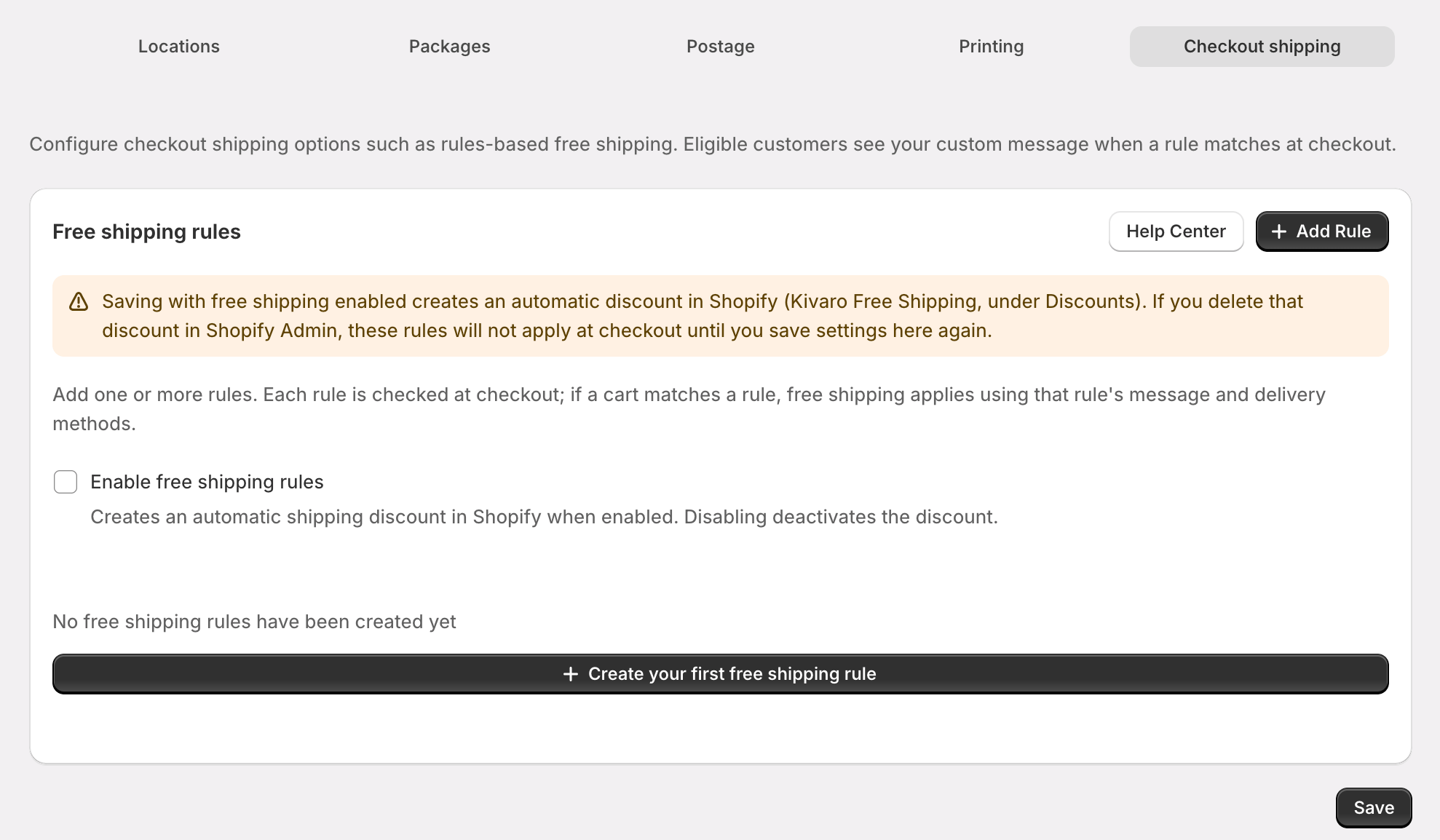
Enable free shipping
1
Turn on free shipping rules
On the Checkout shipping tab, enable Enable free shipping rules.
2
Add at least one rule
Click Add free shipping rule, configure conditions, set a checkout message, and save the rule in the editor.
3
Save settings
Click Save on the settings page. This syncs your enabled rules to Shopify and activates the automatic shipping discount(s).
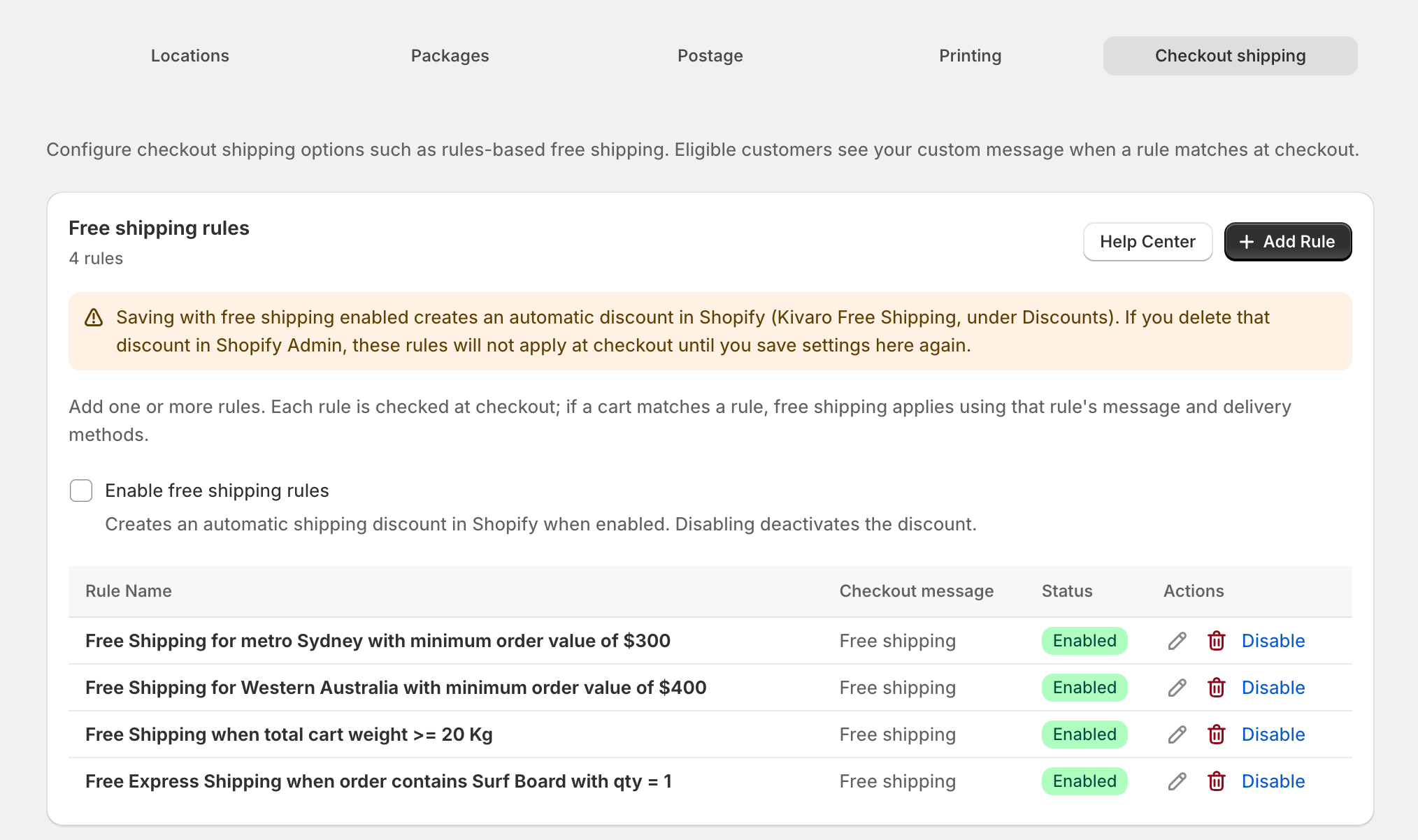
How rules work at checkout
- Rules are evaluated when a customer reaches checkout shipping.
- You can create up to 50 rules. Each rule has up to 10 conditions.
- Within a rule, conditions are combined with AND (every condition must match) or OR (any one condition is enough), using Match conditions using / Combine with previous in the rule editor.
- Each enabled rule syncs as its own Shopify shipping discount and is evaluated independently. Free shipping applies when any matching rule’s discount is applied (for example different postcode zones with different thresholds).
- Delivery methods on a rule limit which shipping options become free. The method names must match a delivery option title at checkout (comparison is case-insensitive). Leave empty to apply free shipping to all shipping methods in the delivery group. If you select methods that are not available for that cart’s delivery group, that rule does not match.
- Checkout message is shown to the customer when the rule applies (max 255 characters).
Rule settings
When you add or edit a rule, these options appear near the top of the rule editor:
New rules default both combination checkboxes on. Existing rules that never set these options are also treated as on.
Combining with other discounts
Shopify only stacks discounts when both sides allow it.- In , leave Combine with order discounts and/or Combine with product discounts enabled on the free shipping rule (defaults are on), then Save settings so Shopify syncs.
- The other discount (for example a discount code) must also allow combining with shipping discounts.
What customers see
Codes created outside Shopify Admin
Discount codes from apps such as Klaviyo may not appear as editable discounts in Shopify Admin → Discounts, or may only appear under app-created discounts. Combination with shipping is usually configured in that app’s coupon / Shopify discount settings. If free shipping vanishes only when a code is applied, check that the code (or its template) allows combining with shipping discounts.Condition types
Minimum subtotal
Require a minimum merchandise total before free shipping applies.Configuration options
- Minimum order subtotal — compared against merchandise only (shipping and taxes are excluded)
- Order value basis
- Before product discounts (default) — uses each cart line’s subtotal before line discounts
- After product discounts — uses each cart line’s total after line discounts
Basis uses cart line merchandise amounts from Shopify. Cart-wide order discount codes or other stacked automatic discounts may not be reflected in the after-discount total, because Shopify can evaluate discounts in parallel.
Example
Location conditions
Shipping zone
Choose Domestic, International, or both.- Domestic — shipping country matches your shop’s country
- International — shipping country is different from your shop’s country
Postcode
Match the shipping address postcode using:- Exact postcodes — comma-separated, e.g.
2000, 2010 - Postcode ranges — comma-separated ranges where start is less than end, e.g.
2000-2010, 3000-3099
2000–9999). Enter at least one valid exact postcode or range.
State / territory
Select one or more Australian states or territories from the list. The shipping address province/state code must match a selected value.Country
Search and select shipping countries. Free shipping applies when the customer’s shipping country matches one of your selections.Cart line items
Match products in the customer’s cart at checkout using product title, SKU, variant title, and optional quantity rules.Configuration options
-
Match mode
- All of line items — every shippable line in the cart must match your filters
- At least one of line items — any shippable line can match
-
Product title, SKU, variant
- Operators: Equals, Not equals, Starts with, Ends with, Contains
- Product title and variant matching are case-insensitive
- SKU matching is case-sensitive
- Enter at least one of product title, SKU, or variant for the condition to be valid
- SKU max 40 characters; variant title max 255 characters
-
Quantity
- Any — line matches regardless of quantity (default)
- Equals — the line quantity must equal the number you enter (exact match, not “or more”)
- Non-shippable items (items that don’t require shipping) are ignored.
Example configurations
Free shipping when the cart contains a gift box
Free shipping for a line of exactly 12 units of a tea product
Free shipping only when the entire cart is VIP catalogue items
Cart weight
Compare the total cart weight in grams against a threshold using standard comparison operators.Configuration options
- Operators: Less than or equal to, Less than, Greater than, Greater than or equal to, Equals
- Unit: Enter weight in grams (e.g.
500for 500 g,5000for 5 kg) - Weight source: Shopify variant weight on each shippable cart line, converted to grams (kilograms, pounds, and ounces are converted automatically)
- Non-shippable lines are excluded from the total
- Items without a positive variant weight contribute 0 g by default
Don’t apply when product weight is missing
Enable Don’t apply when product weight is missing when you want the condition to fail if any shippable item in the cart has no positive variant weight in Shopify. Use this when you only want free shipping for carts where every product has a known weight.Example configurations
Free standard shipping for parcels up to 500 g
Free shipping for orders between 2 kg and 5 kg
Add a second condition with AND:
Free shipping only when all products have weights and cart is under 10 kg
Combined rule examples
These examples mix conditions merchants commonly use alongside cart line items and cart weight.Sydney metro — spend $75+
Free express when cart has fragile SKU and is under 3 kg
Victorian orders over $100, or carts containing a subscription box
Use two rules (each becomes its own discount). Free shipping applies if either rule matches: Rule 1
Rule 2
Domestic lightweight catalogue orders
Checkout result
When a rule matches, customers see your message and eligible delivery methods show $0 shipping. You can verify the underlying discounts in Shopify Admin → Discounts (one Kivaro Free Shipping · … entry per enabled rule). Open a discount to confirm it combines with product and/or order discounts according to your rule settings.Tips and troubleshooting
Free shipping isn't showing at checkout
Free shipping isn't showing at checkout
- Confirm Enable free shipping rules is on and you clicked Save in app settings.
- Check that Kivaro Free Shipping · … discounts still exist under Shopify Admin → Discounts (one per enabled rule).
- Verify the rule is enabled and at least one condition actually matches the test cart.
- If you limited Delivery methods, make sure a selected method title matches a delivery option shown at checkout.
Free shipping disappears when a discount code is applied
Free shipping disappears when a discount code is applied
- In the free shipping rule, confirm Combine with order discounts and/or Combine with product discounts is on, then Save settings in the app.
- Shopify also requires the code to allow combining with shipping. Check the code in Shopify Admin, or in the tool that created it (for example Klaviyo).
- Quick check: remove the code — if free shipping returns, the rule matched and stacking settings are the cause.
Minimum subtotal seems wrong with discounts
Minimum subtotal seems wrong with discounts
- Choose Before product discounts or After product discounts to match how you want the threshold to work.
- Cart-wide order codes may not always reduce the after-discount line totals used at evaluation time.
Cart weight seems wrong
Cart weight seems wrong
- Weights come from variant weight in Shopify, not package dimensions in the app.
- Products without a positive weight contribute 0 g unless you enabled Don’t apply when product weight is missing.
- Only shippable lines are included in the total.
Cart line items condition never matches
Cart line items condition never matches
- Enter at least one of product title, SKU, or variant.
- Check match mode: All requires every shippable line to match; At least one is usually easier for promotional SKUs.
- Product title and variant are case-insensitive; SKU is case-sensitive.
- Quantity Equals means exact quantity on that line, not a minimum.
Difference from Shipping Rules line items
Difference from Shipping Rules line items
Shipping Rules Fulfillment order line items run when you fulfill orders and create labels. Cart line items here run at checkout against the live cart. Use shipping rules for label automation; use free shipping rules for customer-facing checkout discounts.
Related guides
- Shipping Rules Configuration — automate packages and services at fulfillment time
- Complete Setup Guide — full app configuration overview