
Overview
The Australia Post MyPost Business app provides comprehensive support for international shipping, including automatic customs declarations, export documentation, and country-specific requirements. This guide covers everything you need to know about shipping orders overseas.Prerequisites for International Shipping
Before shipping internationally, ensure you have:- Valid Australia Post account with international shipping enabled
- Product information including HS codes and country of origin (these are prefilled from your Shopify product details when available—see HS code and country of origin below)
- Export documentation for high-value shipments
- Compliance knowledge for destination country requirements
International Shipping Process
Order Selection
Customs Declaration
Export Documentation
Service Selection
Label Generation
Customs Declarations
Required Information
For every international shipment, you must provide:HS Codes
Item Descriptions
Country of Origin
Export Reason
HS Code and Country of Origin from Shopify
The app automatically prefills HS code and country of origin for each line item from your Shopify product/variant data when that information is set in Shopify (inventory item’s Harmonized System code and country of origin). This reduces data entry and helps keep customs declarations consistent. You can still edit or add values when creating a label. For best results, maintain HS codes and country of origin on your products in Shopify. Learn how to add HS codes in Shopify: Add HS codes for international shipping.HS Code Management
HS (Harmonized System) codes are international classification codes. The app prefills HS codes from your Shopify product details (each variant’s inventory item Harmonized System code) when you create international labels—research and add codes in Shopify for products you ship internationally to streamline label creation. See Shopify’s guide to adding HS codes for step-by-step instructions.Finding HS Codes
Finding HS Codes
- Product databases: Use online HS code lookup tools - Supplier information: Check with your product suppliers - Customs websites: Official government resources - Industry guides: Sector-specific classification guides
Code Format
Code Format
- 6-10 digits: Most countries use 6-digit codes, some require 8-10 - Format: XXXX.XX.XX (e.g., 1234.56.78) - Specificity: More digits = more specific classification
Common Examples
Common Examples
- Electronics: 8517.12.00 (Mobile phones) - Clothing: 6203.42.40 (Men’s trousers) - Books: 4901.99.00 (Printed books) - Jewelry: 7113.19.50 (Precious metal jewelry)
Commercial value
When you complete a customs declaration, each shipment includes a Commercial value field (Yes / No). This indicates whether the goods are for resale.- Default: Yes (commercial / for resale)
- When to use No: Gifts, samples, or other non-commercial shipments where the goods are not intended for resale
Item descriptions on the customs form
For international labels, you can review and edit the Customs description for each line item directly in the customs declaration modal.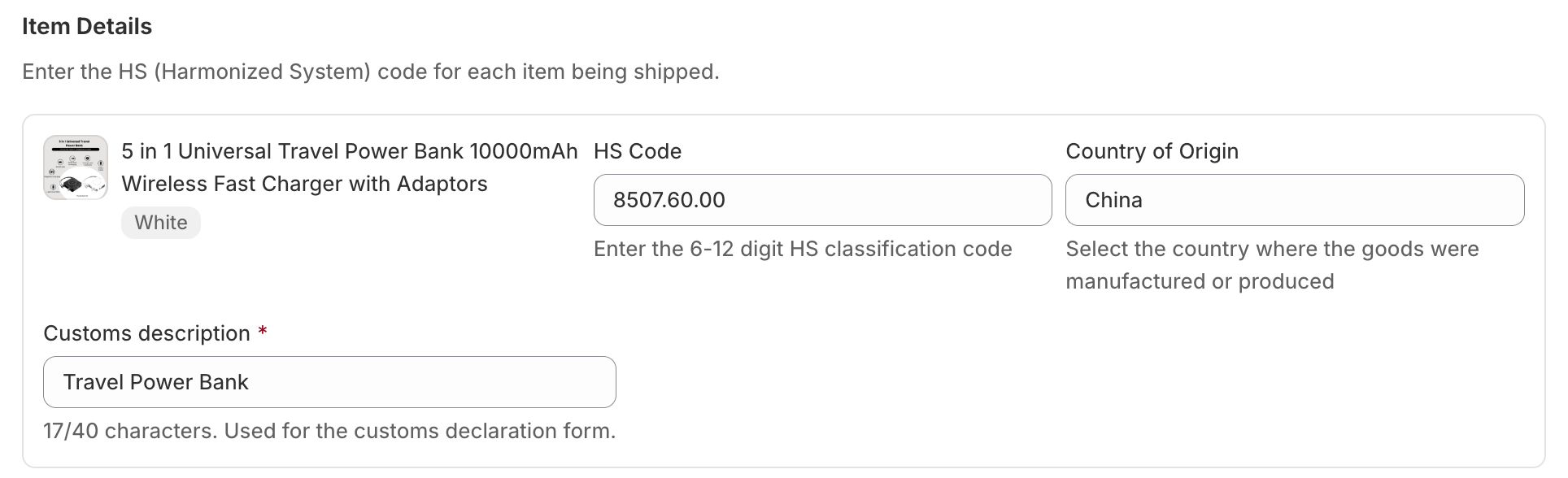
- Each active line item gets its own Customs description field (maximum 40 characters)
- Descriptions are used on the Australia Post customs declaration form—not the separate Goods description field, which is only used when the export reason is Other
- If you have already saved a customs declaration for the order, your saved descriptions are kept and are not overwritten
- Saved description from a previous customs declaration on the order (if any)
- Product metafield value (if you mapped a product metafield in Settings—see below)
- Product title
- Parcel contents (fallback when no title is available)
Prefill item descriptions from a product metafield
If product titles are too generic for customs (for example, internal SKUs or marketing names), you can store a customs-friendly description on each product and have the app prefill it automatically.- The metafield must be a product-level definition in Shopify
- Only Single line text metafield types are supported
- The metafield definition must already exist in Shopify before it appears in the app dropdown
Step 1: Create a product metafield in Shopify
Create a product metafield definition in Shopify Admin for the description you want to use on customs forms—for example,customs.description or a name your team already uses.
Open custom data for products
Add a definition
Name and namespace
Save
Step 2: Enter values on your products
Add a customs-friendly description on each product. Use plain language suitable for customs authorities (material, product type, intended use)—not internal SKUs alone.Open a product
Find Metafields
Enter the customs description
Save the product
Step 3: Map the metafield in Kivaro Settings
Tell the app which product metafield to use for customs description defaults.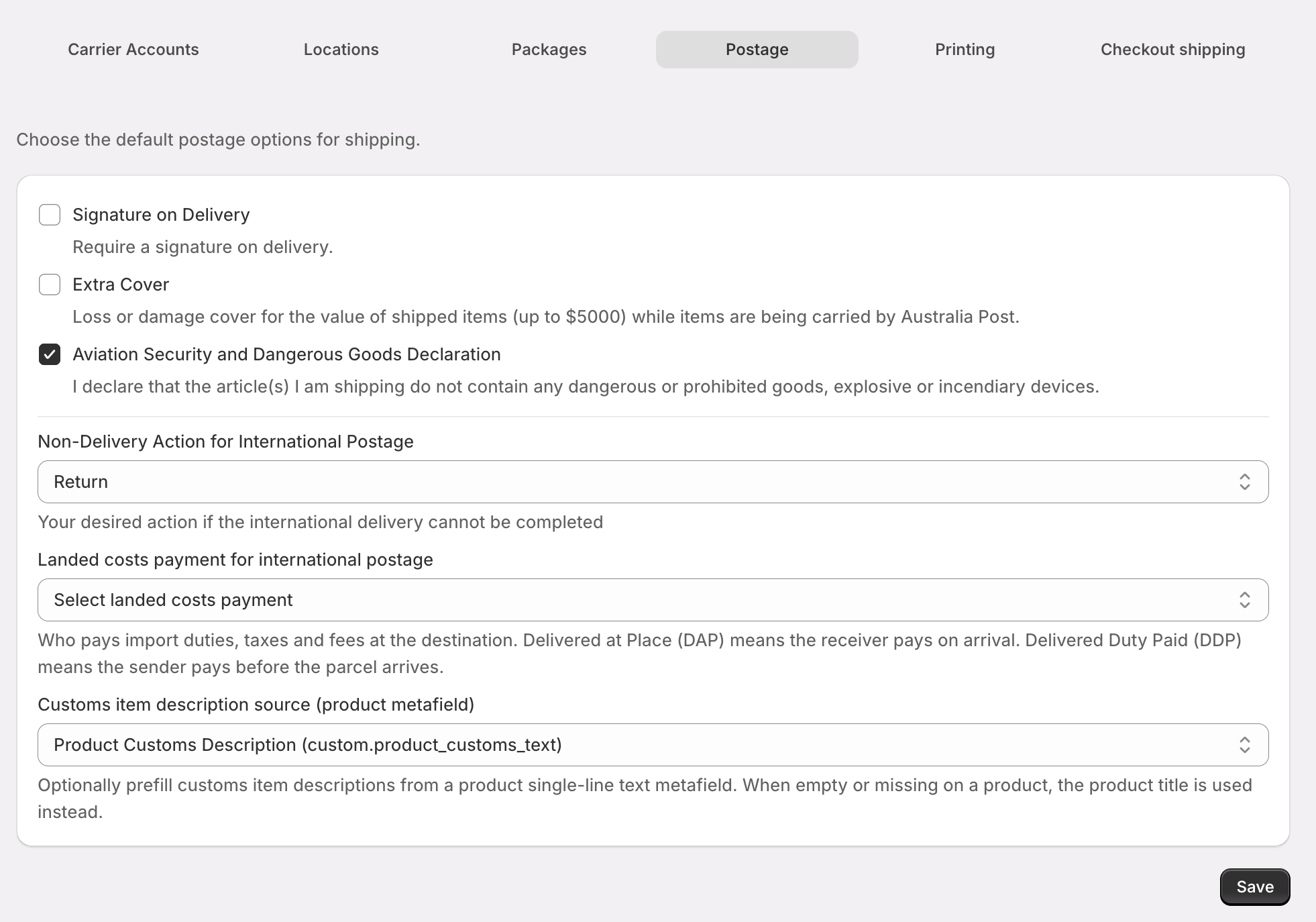
Open app settings
Select the metafield source
Save settings
Export Declaration Numbers (EDN)
For shipments over certain values, you need an Export Declaration Number: When EDN is required:- Shipments valued over $2,000 AUD
- Certain restricted or controlled goods
- Destination country requirements
- Register with Australian Border Force
- Complete export declaration online
- Receive EDN for your shipment
- Enter EDN in the app when creating labels
Setting Importer Reference via Shipping Rules
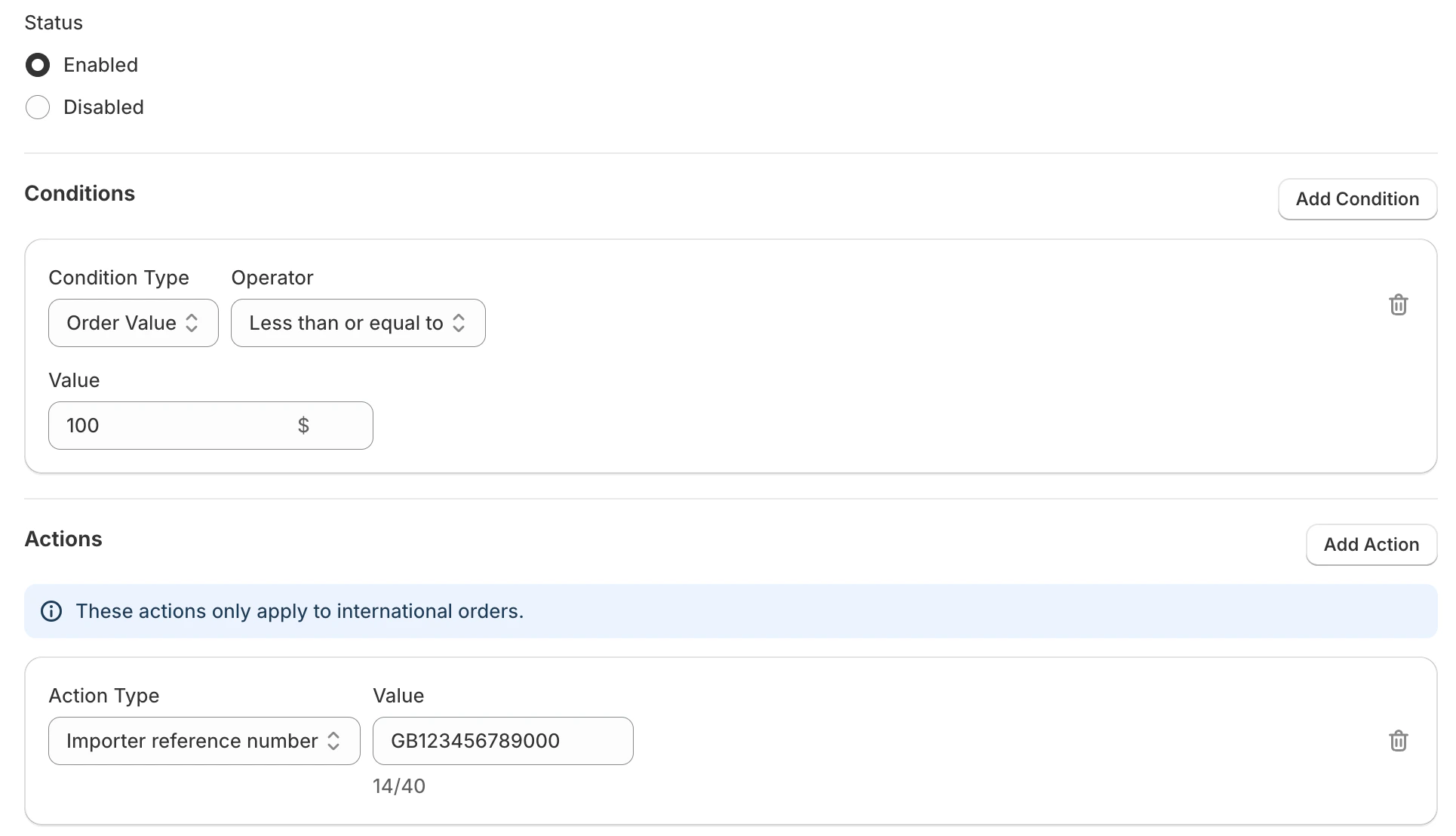
You can automatically set the importer reference number for international shipments using Shipping Rules. When an order matches a rule that has the Importer reference number action, the app applies that value to the customs declaration for the label—useful when you routinely use a fixed importer reference (e.g. your company or client reference) for certain destinations or order types. How to set it:- Go to Shipping Rules in the app and create or edit a rule.
- Add a condition that targets international orders (e.g. Destination country not equals Australia).
- In Actions, add Importer reference number and enter your reference (max 40 characters).
- Save and enable the rule.
Country-Specific Requirements
Popular Destinations
United States
United States
United Kingdom
United Kingdom
Canada
Canada
New Zealand
New Zealand
Creating International Labels
Step-by-Step Process
Select International Order
Add Item Details
Set export details
Add Export Documentation
Review Declaration
Generate Label
Label Format Requirements
- Paper size: A4 only
- Format: Single label per page
- Content: Includes customs declaration
- Printing: High-quality printer recommended
Common International Shipping Issues
Documentation Problems
Missing HS Codes
Missing HS Codes
- Use generic codes as last resort
Incomplete Descriptions
Incomplete Descriptions
Value Discrepancies
Value Discrepancies
Shipping Restrictions
Common restricted items:- Food products: Most countries have strict food import rules
- Electronics: Some countries require special certifications
- Cosmetics: May need health department approval
- Medicines: Usually prohibited without proper licensing
- Cultural items: May require export permits
Delivery Issues
Customs Delays
Customs Delays
Returned Shipments
Returned Shipments
Best Practices
Preparation
Product Database
Documentation Templates
Staff Training
Ongoing Management
Regular Updates
Regular Updates
- Monitor changes in international regulations - Update HS codes as needed - Review destination country requirements - Track shipping performance and issues
Customer Communication
Customer Communication
- Set clear expectations for delivery times - Explain potential customs delays
- Provide tracking information - Handle customs duty questions
Cost Management
Cost Management
- Factor in customs duties and taxes - Consider insurance for valuable shipments - Optimize packaging for international shipping - Monitor shipping costs and performance
Troubleshooting
Common Error Messages
HS Code Required
HS Code Required
Export Declaration Required
Export Declaration Required
Country of Origin Required
Country of Origin Required
Getting Help
If you encounter issues with international shipping:- Check documentation: Ensure all required information is provided
- Verify restrictions: Confirm items can be shipped to destination
- Contact support: Reach out for assistance with complex cases
- Review regulations: Stay updated on changing international requirements