> ## Documentation Index
> Fetch the complete documentation index at: https://help.kivaro.io/llms.txt
> Use this file to discover all available pages before exploring further.
# Free Shipping Rules
> Configure checkout free shipping using rules for order value, location, cart line items, cart weight, and more
export const supportEmail = "support@kivaro.io";
export const appName = "AusPost MyPost Business";
## Overview
Free shipping rules let you offer **automatic free shipping at checkout** when a customer's cart matches conditions you define. When enabled, {appName} creates a Shopify automatic shipping discount (shown in **Shopify Admin → Discounts** as **Kivaro Free Shipping**). Eligible customers see your custom checkout message and selected delivery methods become free.
This guide covers setup, all available conditions, and practical examples—including the newer **Cart line items** and **Cart weight** conditions.
Free shipping rules are available on the **Pro plan**. If you don't see the feature, upgrade your plan or contact [support](mailto:\{supportEmail}).
## Before you start
Make sure your store has **shipping rates** and **delivery methods** configured in Shopify (for example Standard and Express). Free shipping applies to delivery options at checkout.
Cart weight conditions use **variant weight** from Shopify. Enter weights on product variants in **Products → \[product] → Variants**. If a variant has no weight, it counts as **0 g** unless you enable **Don't apply when product weight is missing**.
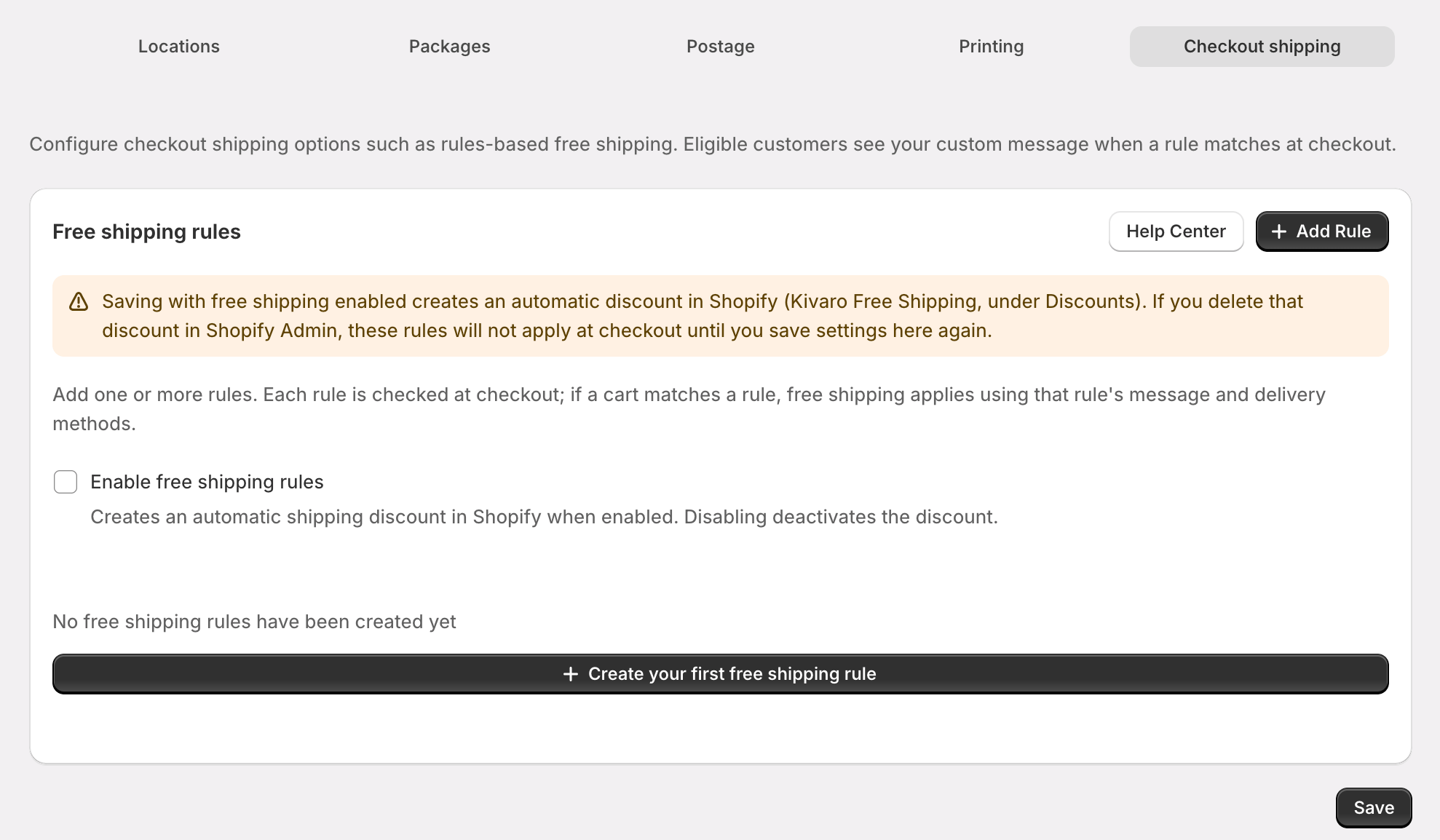
In {appName}, go to **Settings** and open the **Checkout shipping** tab.
 ## Enable free shipping
On the **Checkout shipping** tab, enable **Enable free shipping rules**.
Click **Add free shipping rule**, configure conditions, set a checkout message, and save.
Click **Save** on the settings page. This syncs your rules to Shopify and activates the automatic shipping discount.
Saving with free shipping enabled creates an automatic discount in Shopify. If you delete **Kivaro Free Shipping** under **Discounts**, rules won't apply at checkout until you save settings in the app again.
## Enable free shipping
On the **Checkout shipping** tab, enable **Enable free shipping rules**.
Click **Add free shipping rule**, configure conditions, set a checkout message, and save.
Click **Save** on the settings page. This syncs your rules to Shopify and activates the automatic shipping discount.
Saving with free shipping enabled creates an automatic discount in Shopify. If you delete **Kivaro Free Shipping** under **Discounts**, rules won't apply at checkout until you save settings in the app again.
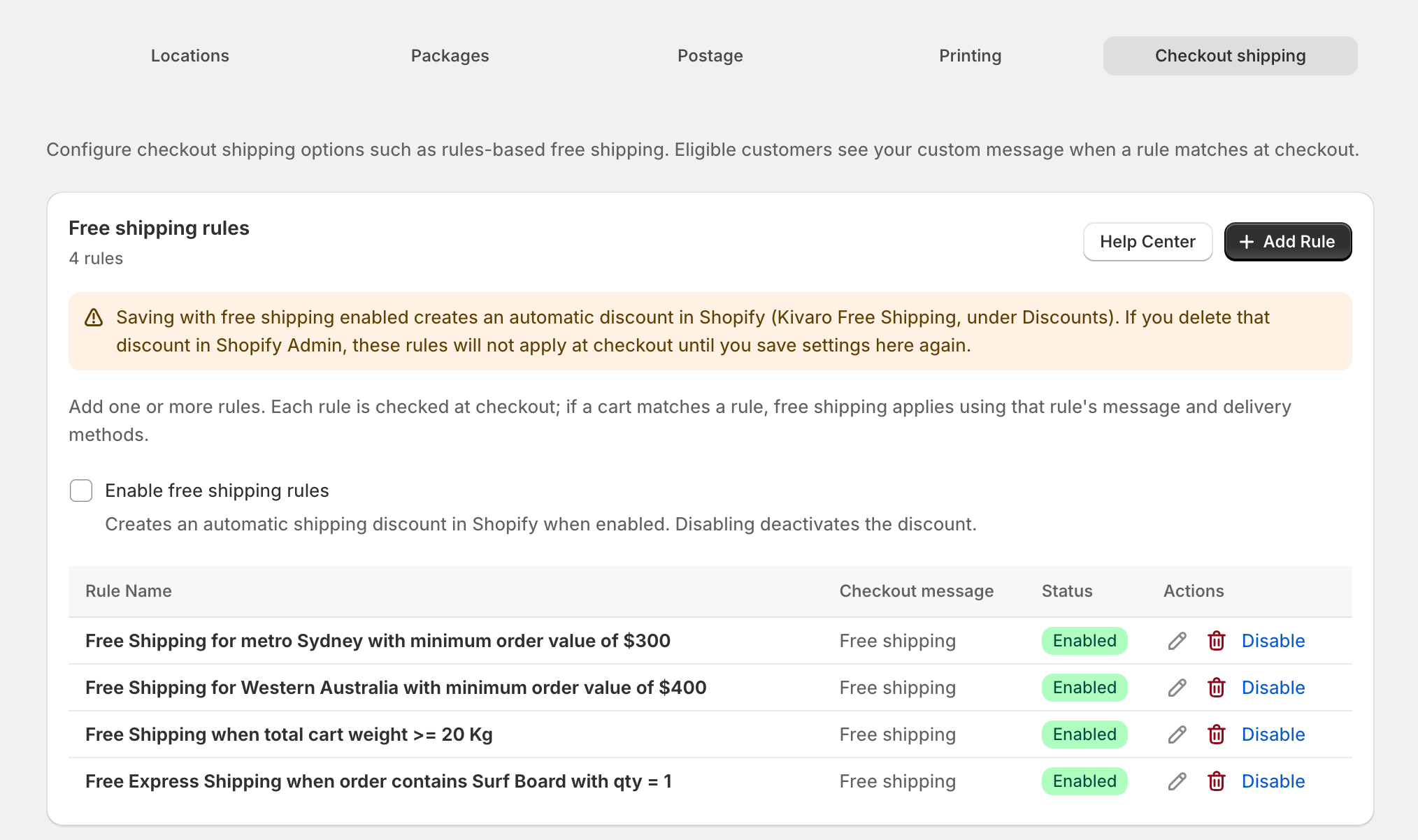 ## How rules work at checkout
* **Rules** are evaluated when a customer reaches checkout shipping.
* Each rule has up to **10 conditions**, combined with **AND** (all must match) or **OR** (any one is enough).
* When you have **multiple rules**, choose **When multiple rules exist**:
* **OR** — the **first matching** enabled rule applies.
* **AND** — **every** enabled rule must match before free shipping applies.
* **Delivery methods** on a rule limit which shipping options become free. Leave empty to apply free shipping to **all** shipping methods in the delivery group.
* **Checkout message** is shown to the customer when the rule applies (max 255 characters).
## Condition types
| Condition | What it checks at checkout |
| ------------------- | --------------------------------------------------------------------------- |
| Minimum subtotal | Merchandise value (before or after product discounts) |
| Shipping zone | Domestic or international (based on shipping country vs your store country) |
| Postcode | Exact postcodes or ranges on the shipping address |
| State / territory | Australian states and territories |
| Country | Shipping country |
| **Cart line items** | Products in the cart by title, SKU, variant, and quantity |
| **Cart weight** | Total weight of shippable cart lines in **grams** |
***
## Cart line items
Match products in the **customer's cart at checkout** using product title, SKU, variant title, and optional quantity rules.
This is similar to **Fulfillment order line items** in [Shipping Rules](/shipping-rules), but it runs at **checkout** against the live cart—not when you create a shipping label.
### Configuration options
* **Match mode**
* **All of line items** — every shippable line in the cart must match your filters
* **At least one of line items** — any shippable line can match
* **Product title, SKU, variant**
* **Operators**: Equals, Not equals, Starts with, Ends with, Contains (case-insensitive for title and variant; SKU matching follows the operator you choose)
* Enter **at least one** of product title, SKU, or variant for the condition to be valid
* SKU max **40** characters; variant title max **255** characters
* **Quantity**
* **Any** — line matches regardless of quantity (default)
* **Equals** — the line quantity must equal the number you enter
* **Non-shippable items** (digital goods, items that don't require shipping) are ignored.
### Example configurations
**Free shipping when the cart contains a gift box**
| Field | Value |
| ---------------- | ------------------------------ |
| Match mode | At least one of line items |
| SKU | Equals `GIFT-BOX` |
| Quantity | Any |
| Checkout message | `Free shipping on gift boxes!` |
**Free shipping for wholesale tea (12+ units of any tea product)**
| Field | Value |
| ---------------- | ---------------------------------- |
| Match mode | At least one of line items |
| Product title | Contains `Tea` |
| Quantity | Equals `12` |
| Checkout message | `Free shipping on bulk tea orders` |
**Free shipping only when the entire cart is VIP catalogue items**
| Field | Value |
| ---------------- | ---------------------------- |
| Match mode | All of line items |
| SKU | Starts with `VIP-` |
| Quantity | Any |
| Checkout message | `Complimentary VIP shipping` |
***
## Cart weight
Compare the **total cart weight in grams** against a threshold using standard comparison operators.
### Configuration options
* **Operators**: Less than or equal to, Less than, Greater than, Greater than or equal to, Equals
* **Unit**: Enter weight in **grams** (e.g. `500` for 500 g, `5000` for 5 kg)
* **Weight source**: Shopify **variant weight** on each shippable cart line, converted to grams (kilograms, pounds, and ounces are converted automatically)
* **Non-shippable lines** are excluded from the total
* **Items without weight** count as **0 g** by default
### Don't apply when product weight is missing
Enable **Don't apply when product weight is missing** when you want the condition to **fail** if any shippable item in the cart has no variant weight in Shopify. Use this when you only want free shipping for carts where every product has a known weight.
| Setting | Behavior |
| ----------------------- | ------------------------------------------------------------------- |
| **Unchecked** (default) | Missing weights count as 0 g; lightweight carts may still qualify |
| **Checked** | Condition does not match if any shippable line lacks variant weight |
### Example configurations
**Free standard shipping for parcels up to 500 g**
| Field | Value |
| ------------------------------------------ | ---------------------------------------------- |
| Operator | Less than or equal to |
| Cart weight | `500` |
| Don't apply when product weight is missing | Unchecked |
| Delivery methods | Standard Shipping only |
| Checkout message | `Free standard shipping on orders under 500 g` |
**Free shipping for orders between 2 kg and 5 kg**
| Field | Value |
| ----------- | ------------------------ |
| Operator | Greater than or equal to |
| Cart weight | `2000` |
Add a second condition (AND):
| Field | Value |
| ----------- | --------------------- |
| Type | Cart weight |
| Operator | Less than or equal to |
| Cart weight | `5000` |
**Free shipping only when all products have weights and cart is under 10 kg**
| Field | Value |
| ------------------------------------------ | --------------------- |
| Operator | Less than or equal to |
| Cart weight | `10000` |
| Don't apply when product weight is missing | **Checked** |
***
## Combined rule examples
These examples mix conditions merchants commonly use alongside cart line items and cart weight.
### Sydney metro — spend \$75+
| Setting | Value |
| ---------------------- | -------------------------------------------------- |
| Rule name | `Sydney metro free shipping` |
| Match conditions using | **AND** |
| Condition 1 | Minimum subtotal — `$75` (after product discounts) |
| Condition 2 | Postcode ranges — `2000-2234` |
| Checkout message | `Free shipping to Sydney metro on orders over $75` |
### Free express when cart has fragile SKU and is under 3 kg
| Setting | Value |
| ---------------------- | ----------------------------------------------------------------------------------- |
| Match conditions using | **AND** |
| Condition 1 | Cart line items — SKU **Equals** `FRAGILE-001`, match **At least one**, qty **Any** |
| Condition 2 | Cart weight — **Less than or equal to** `3000` |
| Delivery methods | Express Shipping |
| Checkout message | `Free express shipping on fragile items under 3 kg` |
### Victorian orders over \$100 OR carts containing subscription box
| Setting | Value |
| ---------------------- | --------------------------------------------------------------------------------------------------------------------------------------- |
| Match conditions using | **OR** |
| Condition 1 | Minimum subtotal `$100` **AND** State **VIC** (use two conditions with AND inside the rule, or split into separate rules—see tip below) |
| Condition 2 | Cart line items — SKU **Equals** `SUB-BOX-MONTHLY` |
For **(A AND B) OR C**, use **OR** between two rules instead of packing complex logic into one rule: Rule 1 = min subtotal + VIC with AND; Rule 2 = cart line items for the subscription SKU. Set **When multiple rules exist** to **OR**.
### Domestic lightweight catalogue orders
| Setting | Value |
| ------------------------------------------ | ---------------------------------------------- |
| Match conditions using | **AND** |
| Condition 1 | Shipping zone — **Domestic** |
| Condition 2 | Cart weight — **Less than or equal to** `2000` |
| Don't apply when product weight is missing | Checked |
| Checkout message | `Free shipping on lightweight domestic orders` |
***
## Checkout result
When a rule matches, customers see your message and eligible delivery methods show **\$0** shipping.
You can verify the underlying discount in **Shopify Admin → Discounts**.
***
## Tips and troubleshooting
* Confirm **Enable free shipping rules** is on and you clicked **Save** in app settings.
* Check that **Kivaro Free Shipping** still exists under **Shopify Admin → Discounts**.
* Verify the rule is **enabled** and at least one condition actually matches the test cart.
* If you limited **Delivery methods**, make sure the customer selected one of those methods.
* Weights come from **variant weight** in Shopify, not package dimensions in the app.
* Products without weight count as **0 g** unless you enabled **Don't apply when product weight is missing**.
* Only **shippable** lines are included in the total.
* Enter at least one of **product title**, **SKU**, or **variant**.
* Check **match mode**: **All** requires every shippable line to match; **At least one** is usually easier for promotional SKUs.
* SKU and title must match what's stored in Shopify (operators are case-insensitive for title and variant).
[Shipping Rules](/shipping-rules) **Fulfillment order line items** run when you fulfill orders and create labels. **Cart line items** here run at **checkout** against the live cart. Use shipping rules for label automation; use free shipping rules for customer-facing checkout discounts.
***
## Related guides
* [Shipping Rules Configuration](/shipping-rules) — automate packages and services at fulfillment time
* [Complete Setup Guide](/getting-started) — full app configuration overview
Need help? Email [support](mailto:\{supportEmail}).
## How rules work at checkout
* **Rules** are evaluated when a customer reaches checkout shipping.
* Each rule has up to **10 conditions**, combined with **AND** (all must match) or **OR** (any one is enough).
* When you have **multiple rules**, choose **When multiple rules exist**:
* **OR** — the **first matching** enabled rule applies.
* **AND** — **every** enabled rule must match before free shipping applies.
* **Delivery methods** on a rule limit which shipping options become free. Leave empty to apply free shipping to **all** shipping methods in the delivery group.
* **Checkout message** is shown to the customer when the rule applies (max 255 characters).
## Condition types
| Condition | What it checks at checkout |
| ------------------- | --------------------------------------------------------------------------- |
| Minimum subtotal | Merchandise value (before or after product discounts) |
| Shipping zone | Domestic or international (based on shipping country vs your store country) |
| Postcode | Exact postcodes or ranges on the shipping address |
| State / territory | Australian states and territories |
| Country | Shipping country |
| **Cart line items** | Products in the cart by title, SKU, variant, and quantity |
| **Cart weight** | Total weight of shippable cart lines in **grams** |
***
## Cart line items
Match products in the **customer's cart at checkout** using product title, SKU, variant title, and optional quantity rules.
This is similar to **Fulfillment order line items** in [Shipping Rules](/shipping-rules), but it runs at **checkout** against the live cart—not when you create a shipping label.
### Configuration options
* **Match mode**
* **All of line items** — every shippable line in the cart must match your filters
* **At least one of line items** — any shippable line can match
* **Product title, SKU, variant**
* **Operators**: Equals, Not equals, Starts with, Ends with, Contains (case-insensitive for title and variant; SKU matching follows the operator you choose)
* Enter **at least one** of product title, SKU, or variant for the condition to be valid
* SKU max **40** characters; variant title max **255** characters
* **Quantity**
* **Any** — line matches regardless of quantity (default)
* **Equals** — the line quantity must equal the number you enter
* **Non-shippable items** (digital goods, items that don't require shipping) are ignored.
### Example configurations
**Free shipping when the cart contains a gift box**
| Field | Value |
| ---------------- | ------------------------------ |
| Match mode | At least one of line items |
| SKU | Equals `GIFT-BOX` |
| Quantity | Any |
| Checkout message | `Free shipping on gift boxes!` |
**Free shipping for wholesale tea (12+ units of any tea product)**
| Field | Value |
| ---------------- | ---------------------------------- |
| Match mode | At least one of line items |
| Product title | Contains `Tea` |
| Quantity | Equals `12` |
| Checkout message | `Free shipping on bulk tea orders` |
**Free shipping only when the entire cart is VIP catalogue items**
| Field | Value |
| ---------------- | ---------------------------- |
| Match mode | All of line items |
| SKU | Starts with `VIP-` |
| Quantity | Any |
| Checkout message | `Complimentary VIP shipping` |
***
## Cart weight
Compare the **total cart weight in grams** against a threshold using standard comparison operators.
### Configuration options
* **Operators**: Less than or equal to, Less than, Greater than, Greater than or equal to, Equals
* **Unit**: Enter weight in **grams** (e.g. `500` for 500 g, `5000` for 5 kg)
* **Weight source**: Shopify **variant weight** on each shippable cart line, converted to grams (kilograms, pounds, and ounces are converted automatically)
* **Non-shippable lines** are excluded from the total
* **Items without weight** count as **0 g** by default
### Don't apply when product weight is missing
Enable **Don't apply when product weight is missing** when you want the condition to **fail** if any shippable item in the cart has no variant weight in Shopify. Use this when you only want free shipping for carts where every product has a known weight.
| Setting | Behavior |
| ----------------------- | ------------------------------------------------------------------- |
| **Unchecked** (default) | Missing weights count as 0 g; lightweight carts may still qualify |
| **Checked** | Condition does not match if any shippable line lacks variant weight |
### Example configurations
**Free standard shipping for parcels up to 500 g**
| Field | Value |
| ------------------------------------------ | ---------------------------------------------- |
| Operator | Less than or equal to |
| Cart weight | `500` |
| Don't apply when product weight is missing | Unchecked |
| Delivery methods | Standard Shipping only |
| Checkout message | `Free standard shipping on orders under 500 g` |
**Free shipping for orders between 2 kg and 5 kg**
| Field | Value |
| ----------- | ------------------------ |
| Operator | Greater than or equal to |
| Cart weight | `2000` |
Add a second condition (AND):
| Field | Value |
| ----------- | --------------------- |
| Type | Cart weight |
| Operator | Less than or equal to |
| Cart weight | `5000` |
**Free shipping only when all products have weights and cart is under 10 kg**
| Field | Value |
| ------------------------------------------ | --------------------- |
| Operator | Less than or equal to |
| Cart weight | `10000` |
| Don't apply when product weight is missing | **Checked** |
***
## Combined rule examples
These examples mix conditions merchants commonly use alongside cart line items and cart weight.
### Sydney metro — spend \$75+
| Setting | Value |
| ---------------------- | -------------------------------------------------- |
| Rule name | `Sydney metro free shipping` |
| Match conditions using | **AND** |
| Condition 1 | Minimum subtotal — `$75` (after product discounts) |
| Condition 2 | Postcode ranges — `2000-2234` |
| Checkout message | `Free shipping to Sydney metro on orders over $75` |
### Free express when cart has fragile SKU and is under 3 kg
| Setting | Value |
| ---------------------- | ----------------------------------------------------------------------------------- |
| Match conditions using | **AND** |
| Condition 1 | Cart line items — SKU **Equals** `FRAGILE-001`, match **At least one**, qty **Any** |
| Condition 2 | Cart weight — **Less than or equal to** `3000` |
| Delivery methods | Express Shipping |
| Checkout message | `Free express shipping on fragile items under 3 kg` |
### Victorian orders over \$100 OR carts containing subscription box
| Setting | Value |
| ---------------------- | --------------------------------------------------------------------------------------------------------------------------------------- |
| Match conditions using | **OR** |
| Condition 1 | Minimum subtotal `$100` **AND** State **VIC** (use two conditions with AND inside the rule, or split into separate rules—see tip below) |
| Condition 2 | Cart line items — SKU **Equals** `SUB-BOX-MONTHLY` |
For **(A AND B) OR C**, use **OR** between two rules instead of packing complex logic into one rule: Rule 1 = min subtotal + VIC with AND; Rule 2 = cart line items for the subscription SKU. Set **When multiple rules exist** to **OR**.
### Domestic lightweight catalogue orders
| Setting | Value |
| ------------------------------------------ | ---------------------------------------------- |
| Match conditions using | **AND** |
| Condition 1 | Shipping zone — **Domestic** |
| Condition 2 | Cart weight — **Less than or equal to** `2000` |
| Don't apply when product weight is missing | Checked |
| Checkout message | `Free shipping on lightweight domestic orders` |
***
## Checkout result
When a rule matches, customers see your message and eligible delivery methods show **\$0** shipping.
You can verify the underlying discount in **Shopify Admin → Discounts**.
***
## Tips and troubleshooting
* Confirm **Enable free shipping rules** is on and you clicked **Save** in app settings.
* Check that **Kivaro Free Shipping** still exists under **Shopify Admin → Discounts**.
* Verify the rule is **enabled** and at least one condition actually matches the test cart.
* If you limited **Delivery methods**, make sure the customer selected one of those methods.
* Weights come from **variant weight** in Shopify, not package dimensions in the app.
* Products without weight count as **0 g** unless you enabled **Don't apply when product weight is missing**.
* Only **shippable** lines are included in the total.
* Enter at least one of **product title**, **SKU**, or **variant**.
* Check **match mode**: **All** requires every shippable line to match; **At least one** is usually easier for promotional SKUs.
* SKU and title must match what's stored in Shopify (operators are case-insensitive for title and variant).
[Shipping Rules](/shipping-rules) **Fulfillment order line items** run when you fulfill orders and create labels. **Cart line items** here run at **checkout** against the live cart. Use shipping rules for label automation; use free shipping rules for customer-facing checkout discounts.
***
## Related guides
* [Shipping Rules Configuration](/shipping-rules) — automate packages and services at fulfillment time
* [Complete Setup Guide](/getting-started) — full app configuration overview
Need help? Email [support](mailto:\{supportEmail}).