> ## Documentation Index
> Fetch the complete documentation index at: https://help.kivaro.io/llms.txt
> Use this file to discover all available pages before exploring further.
# Fulfill Later & Labels Purchased
> Buy Australia Post labels now and mark Shopify orders as fulfilled when you are ready to pack and ship
export const calendlyUrl = "https://calendly.com/kivaro-support/30min";
export const supportEmail = "support@kivaro.io";
export const appName = "AusPost MyPost Business";
## Overview
**Fulfill later** (also called **Skip fulfilling orders**) lets you **buy MyPost Business shipping labels without marking the Shopify orders as fulfilled yet**.
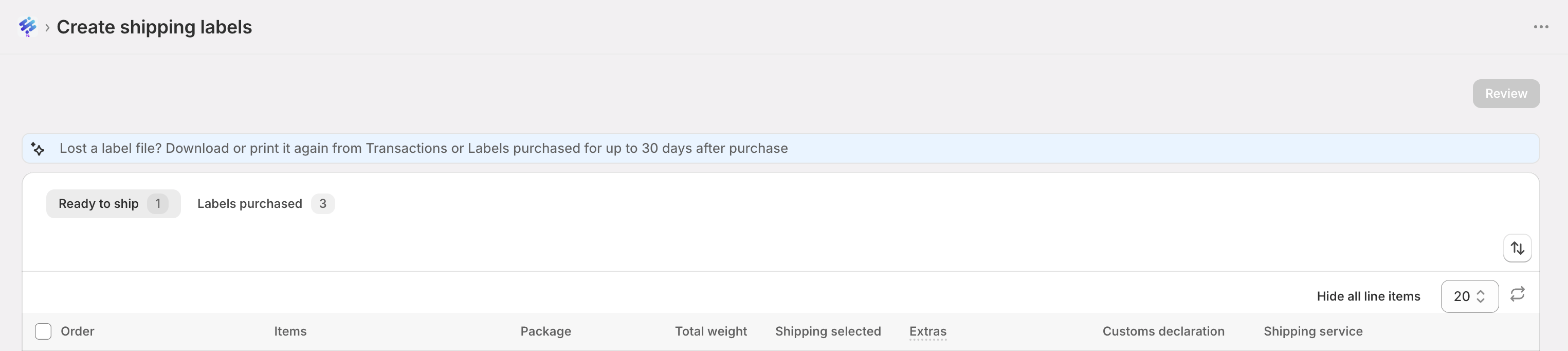
Labels stay in the **Labels purchased** tab until you are ready to pack. When you mark them as fulfilled, tracking is added to each Shopify order and you can optionally email the customer.
This is designed for busy warehouses that want to:
* Buy postage in a morning batch
* Print labels later
* Fulfil in Shopify only when parcels actually leave the bench
 ## Plan availability
**Growth plan and above.** Fulfill later and the **Labels purchased** tab are available on Growth, Scale, and Pro. Starter plan merchants will see an upgrade prompt: *Fulfill later is available on Growth plan and above*.
## How the two tabs work
| Tab | What you see |
| -------------------- | ---------------------------------------------------------------------------------------------------- |
| **Ready to ship** | Unfulfilled fulfilment orders that still need a label (or need another partial label) |
| **Labels purchased** | Labels you already bought with **Skip fulfilling orders**, waiting to be marked fulfilled in Shopify |
When you buy with fulfill later:
* Orders move from **Ready to ship** into **Labels purchased**
* Shopify fulfilment status does **not** change yet
* Reserved quantities stay out of Ready to ship so you do not buy a duplicate label by mistake
## Buy labels without fulfilling
On **Shipping Labels → Ready to ship**, select the orders you want to purchase.
Click **Review label(s)** and confirm package, weight, service, and postage features as usual.
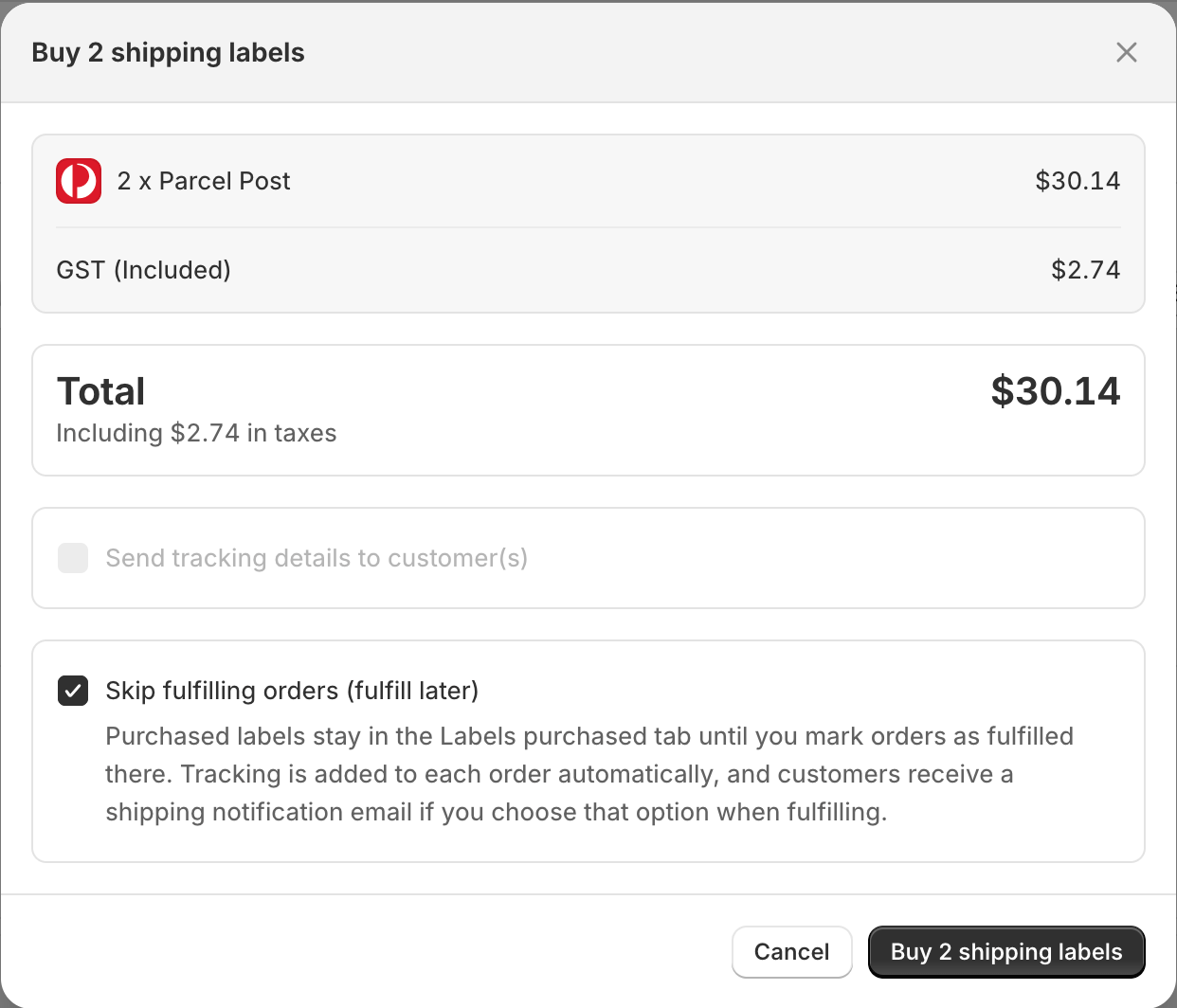
In the buy postage confirmation, tick **Skip fulfilling orders (fulfill later)**.
While skip is on, **Send tracking details to customer(s)** is turned off. Customers are notified later, when you mark orders as fulfilled (if you choose that option).
Complete the purchase. You will see a message that labels are ready to print and that orders have **not** been fulfilled yet.
Open the **Labels purchased** tab. Your new labels appear with tracking, postage, carrier reference, and download/print actions.
## Plan availability
**Growth plan and above.** Fulfill later and the **Labels purchased** tab are available on Growth, Scale, and Pro. Starter plan merchants will see an upgrade prompt: *Fulfill later is available on Growth plan and above*.
## How the two tabs work
| Tab | What you see |
| -------------------- | ---------------------------------------------------------------------------------------------------- |
| **Ready to ship** | Unfulfilled fulfilment orders that still need a label (or need another partial label) |
| **Labels purchased** | Labels you already bought with **Skip fulfilling orders**, waiting to be marked fulfilled in Shopify |
When you buy with fulfill later:
* Orders move from **Ready to ship** into **Labels purchased**
* Shopify fulfilment status does **not** change yet
* Reserved quantities stay out of Ready to ship so you do not buy a duplicate label by mistake
## Buy labels without fulfilling
On **Shipping Labels → Ready to ship**, select the orders you want to purchase.
Click **Review label(s)** and confirm package, weight, service, and postage features as usual.
In the buy postage confirmation, tick **Skip fulfilling orders (fulfill later)**.
While skip is on, **Send tracking details to customer(s)** is turned off. Customers are notified later, when you mark orders as fulfilled (if you choose that option).
Complete the purchase. You will see a message that labels are ready to print and that orders have **not** been fulfilled yet.
Open the **Labels purchased** tab. Your new labels appear with tracking, postage, carrier reference, and download/print actions.
 ## Mark orders as fulfilled
When parcels are packed and ready to hand to Australia Post (or your courier pickup):
Go to **Shipping Labels → Labels purchased**.
Select one or more rows.
Click **Mark as fulfilled** (page action or bulk action).
Confirm that Shopify should fulfil those orders with the purchased tracking numbers. Optionally tick **Send tracking details to customer(s)**.
After success:
* Tracking is added to the Shopify order(s)
* Rows leave **Labels purchased**
* Those fulfilment quantities no longer sit in your deferred queue
## Cancel a purchased label (workflow reset)
Sometimes you buy a label too early — wrong service, customer changed address, or you need to re-pack. Use **Cancel label** on **Labels purchased**.
### Important: cancel in the app is not a MyPost refund
Cancelling in {appName}:
* Removes the label from **Labels purchased**
* Returns the order/quantity to **Ready to ship**
* Does **not** refund postage with Australia Post
MyPost Business does **not** support cancelling labels through the app API. If you no longer need the postage, you must request a **refund or void in MyPost Business**.
## Mark orders as fulfilled
When parcels are packed and ready to hand to Australia Post (or your courier pickup):
Go to **Shipping Labels → Labels purchased**.
Select one or more rows.
Click **Mark as fulfilled** (page action or bulk action).
Confirm that Shopify should fulfil those orders with the purchased tracking numbers. Optionally tick **Send tracking details to customer(s)**.
After success:
* Tracking is added to the Shopify order(s)
* Rows leave **Labels purchased**
* Those fulfilment quantities no longer sit in your deferred queue
## Cancel a purchased label (workflow reset)
Sometimes you buy a label too early — wrong service, customer changed address, or you need to re-pack. Use **Cancel label** on **Labels purchased**.
### Important: cancel in the app is not a MyPost refund
Cancelling in {appName}:
* Removes the label from **Labels purchased**
* Returns the order/quantity to **Ready to ship**
* Does **not** refund postage with Australia Post
MyPost Business does **not** support cancelling labels through the app API. If you no longer need the postage, you must request a **refund or void in MyPost Business**.
 ### How to cancel
Select the label row, or use the cancel (delete) icon next to download/print.
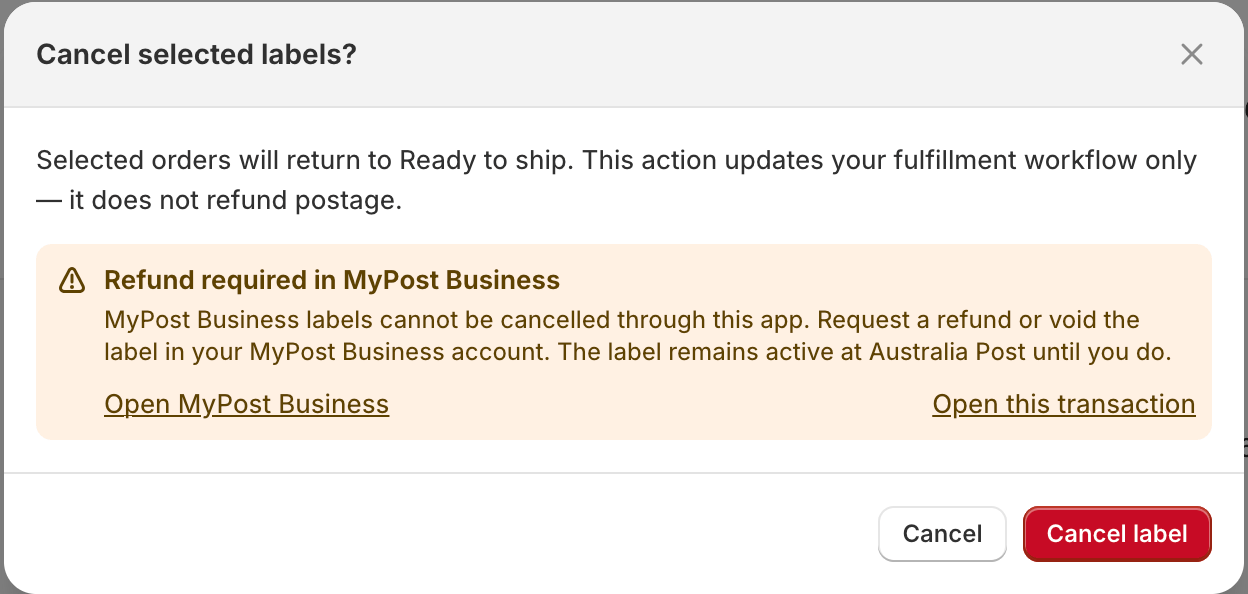
Confirm that the order will return to Ready to ship, and that this does **not** refund postage.
For MyPost Business labels, the modal warns you to request a refund in MyPost Business. Use **Open MyPost Business** or **Open this transaction** when shown.
After cancel, the order is back on **Ready to ship** so you can buy a new label if needed.
### Refund in MyPost Business
1. Log in to [MyPost Business](https://auspost.com.au/mypost-business)
2. Open **Transactions** and find the label/transaction
3. Request a **Refund** for the unused label
4. Successful refunds usually return to your card or PayPal within **5–10 business days**
If you cancel in the app and then buy a new label without refunding the old one in MyPost Business, you may be charged twice.
## Partial fulfilments
Fulfill later works with **partial quantities**:
* You can buy a label for some items now and leave the rest on Ready to ship
* Shopify remaining quantities stay correct until you mark the purchased portion as fulfilled
* Cancel returns only that reserved quantity to Ready to ship
## Download and print purchased labels
From **Labels purchased** you can:
* Copy the tracking number
* Open Australia Post tracking
* Open the MyPost Business transaction reference
* Download or print the label PDF
Lost the PDF? You can usually download again from **Labels purchased** or **Transactions** for up to **30 days** after purchase. Changing print layouts (A4 / thermal) is typically available within **48 hours** of purchase.
## Tips for merchants
* Use fulfill later for **batch label buying** before your packing shift starts.
* Turn customer tracking emails **on at Mark as fulfilled**, so customers are not notified before the parcel leaves.
* Do not leave unused labels sitting unpaid for refund — cancel in-app **and** refund in MyPost when postage will not be used.
* Orders in Labels purchased cannot be selected for [Ship together](/combine-shipments) until you cancel or fulfil them.
## Troubleshooting
Your store needs Growth plan or above. Upgrade in the app billing settings, then refresh Shipping Labels.
Check **Labels purchased**. It is waiting for **Mark as fulfilled**.
That is expected. Cancel only resets your Shopify workflow. Refund unused labels in MyPost Business.
Tracking emails are sent when you mark as fulfilled **and** choose **Send tracking details to customer(s)**. They are not sent at purchase time when fulfill later is enabled.
Carrier reprint windows are limited. Try download again within 30 days from Labels purchased or Transactions. After that, the stored copy may no longer be available.
## Need Help?
Schedule a one-on-one session with our shipping experts
Get help with fulfill later, Labels purchased, or cancellations
### How to cancel
Select the label row, or use the cancel (delete) icon next to download/print.
Confirm that the order will return to Ready to ship, and that this does **not** refund postage.
For MyPost Business labels, the modal warns you to request a refund in MyPost Business. Use **Open MyPost Business** or **Open this transaction** when shown.
After cancel, the order is back on **Ready to ship** so you can buy a new label if needed.
### Refund in MyPost Business
1. Log in to [MyPost Business](https://auspost.com.au/mypost-business)
2. Open **Transactions** and find the label/transaction
3. Request a **Refund** for the unused label
4. Successful refunds usually return to your card or PayPal within **5–10 business days**
If you cancel in the app and then buy a new label without refunding the old one in MyPost Business, you may be charged twice.
## Partial fulfilments
Fulfill later works with **partial quantities**:
* You can buy a label for some items now and leave the rest on Ready to ship
* Shopify remaining quantities stay correct until you mark the purchased portion as fulfilled
* Cancel returns only that reserved quantity to Ready to ship
## Download and print purchased labels
From **Labels purchased** you can:
* Copy the tracking number
* Open Australia Post tracking
* Open the MyPost Business transaction reference
* Download or print the label PDF
Lost the PDF? You can usually download again from **Labels purchased** or **Transactions** for up to **30 days** after purchase. Changing print layouts (A4 / thermal) is typically available within **48 hours** of purchase.
## Tips for merchants
* Use fulfill later for **batch label buying** before your packing shift starts.
* Turn customer tracking emails **on at Mark as fulfilled**, so customers are not notified before the parcel leaves.
* Do not leave unused labels sitting unpaid for refund — cancel in-app **and** refund in MyPost when postage will not be used.
* Orders in Labels purchased cannot be selected for [Ship together](/combine-shipments) until you cancel or fulfil them.
## Troubleshooting
Your store needs Growth plan or above. Upgrade in the app billing settings, then refresh Shipping Labels.
Check **Labels purchased**. It is waiting for **Mark as fulfilled**.
That is expected. Cancel only resets your Shopify workflow. Refund unused labels in MyPost Business.
Tracking emails are sent when you mark as fulfilled **and** choose **Send tracking details to customer(s)**. They are not sent at purchase time when fulfill later is enabled.
Carrier reprint windows are limited. Try download again within 30 days from Labels purchased or Transactions. After that, the stored copy may no longer be available.
## Need Help?
Schedule a one-on-one session with our shipping experts
Get help with fulfill later, Labels purchased, or cancellations