> ## Documentation Index
> Fetch the complete documentation index at: https://help.kivaro.io/llms.txt
> Use this file to discover all available pages before exploring further.
# Ship Together (Combine Shipments)
> Buy one Australia Post label for multiple orders going to the same customer and address
export const calendlyUrl = "https://calendly.com/kivaro-support/30min";
export const supportEmail = "support@kivaro.io";
export const appName = "AusPost MyPost Business";
## Overview
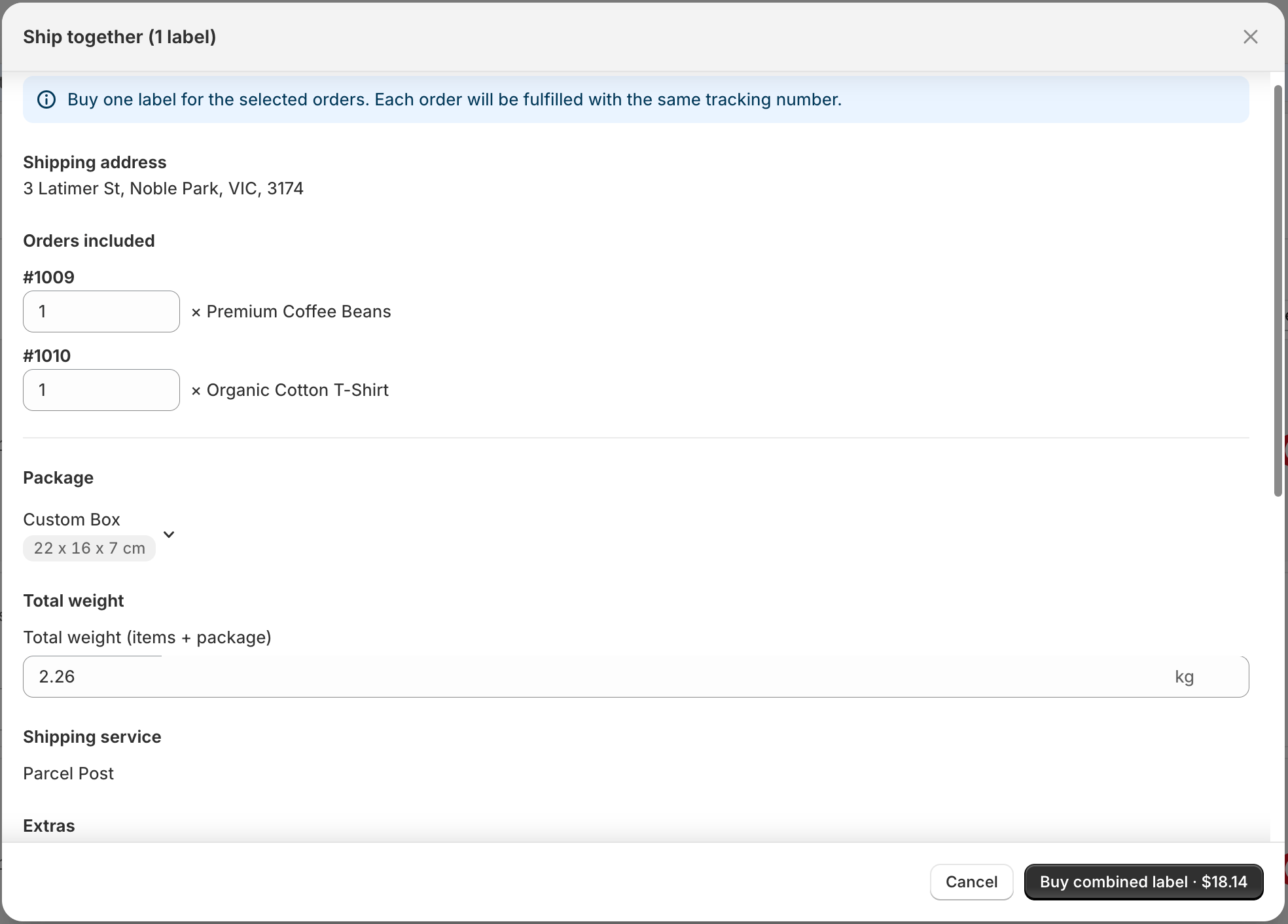
**Ship together (1 label)** lets you buy a **single Australia Post shipping label** for two or more orders that are going to the **same customer and shipping address**. Each order is fulfilled in Shopify with the **same tracking number**, so your customer gets one parcel instead of multiple.
This is especially useful for merchants who receive several small orders from the same buyer in a short window (for example, same-day reorders or split checkouts).
 ## Why use Ship together?
One parcel is often cheaper than two or three separate Parcel Post or Express Post consignments
Pack one box instead of multiple shipments for the same address
Your customer gets a single tracking update for everything you shipped together
Each Shopify order is still marked fulfilled with that shared tracking number
## Plan availability
Ship together is available on **Starter**, **Growth**, **Scale**, and **Pro** plans.
## When can you combine orders?
All selected orders must meet **every** condition below:
| Requirement | What it means |
| ------------------------- | -------------------------------------------------------------------------------- |
| At least 2 orders | Select two or more rows on **Ready to ship** |
| Domestic only | Destination must be Australia (international orders cannot be combined) |
| Same customer | Same Shopify customer, or the same email on every order |
| Same shipping address | Street, suburb, state, and postcode must match |
| Same fulfilment location | Orders must ship from the same warehouse / location |
| Same shipping service | Each row must already have the same Parcel Post or Express Post service selected |
| No pending deferred label | Orders waiting in **Labels purchased** cannot be combined again |
| Valid package and weight | Package, weight, and extras must pass validation |
If something does not match, the bulk action stays disabled with a message such as *Selected orders cannot be combined into one label*.
## How to ship together
Open {appName} and go to **Shipping Labels → Ready to ship**.
Choose the package, total weight, postage features, and shipping service for each order. Make sure the service is the same on every row you want to combine.
Tick two or more orders that meet the eligibility rules above.
Open bulk actions and select **Ship together (1 label)**.
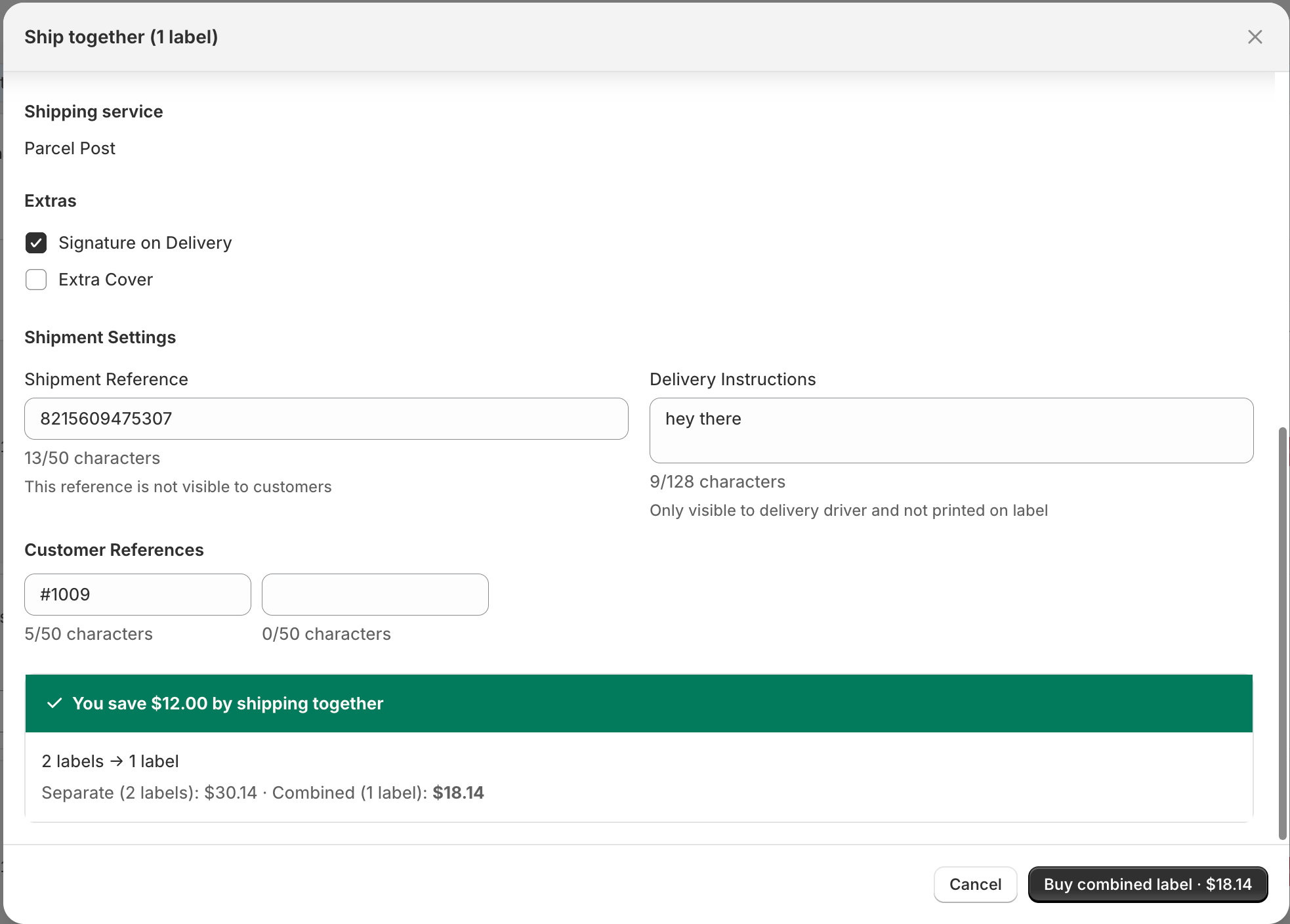
In the modal, check the shared address, items and quantities, package, weight, extras, and shipment settings. If recipient names differ, choose which name appears on the label.
Wait for the postage quote. You may see a savings message such as *You save \$X by shipping together*, or that the combined cost is the same as shipping separately.
Confirm **Buy combined label**. One Australia Post label is purchased, and each selected order is fulfilled with the same tracking number.
## Why use Ship together?
One parcel is often cheaper than two or three separate Parcel Post or Express Post consignments
Pack one box instead of multiple shipments for the same address
Your customer gets a single tracking update for everything you shipped together
Each Shopify order is still marked fulfilled with that shared tracking number
## Plan availability
Ship together is available on **Starter**, **Growth**, **Scale**, and **Pro** plans.
## When can you combine orders?
All selected orders must meet **every** condition below:
| Requirement | What it means |
| ------------------------- | -------------------------------------------------------------------------------- |
| At least 2 orders | Select two or more rows on **Ready to ship** |
| Domestic only | Destination must be Australia (international orders cannot be combined) |
| Same customer | Same Shopify customer, or the same email on every order |
| Same shipping address | Street, suburb, state, and postcode must match |
| Same fulfilment location | Orders must ship from the same warehouse / location |
| Same shipping service | Each row must already have the same Parcel Post or Express Post service selected |
| No pending deferred label | Orders waiting in **Labels purchased** cannot be combined again |
| Valid package and weight | Package, weight, and extras must pass validation |
If something does not match, the bulk action stays disabled with a message such as *Selected orders cannot be combined into one label*.
## How to ship together
Open {appName} and go to **Shipping Labels → Ready to ship**.
Choose the package, total weight, postage features, and shipping service for each order. Make sure the service is the same on every row you want to combine.
Tick two or more orders that meet the eligibility rules above.
Open bulk actions and select **Ship together (1 label)**.
In the modal, check the shared address, items and quantities, package, weight, extras, and shipment settings. If recipient names differ, choose which name appears on the label.
Wait for the postage quote. You may see a savings message such as *You save \$X by shipping together*, or that the combined cost is the same as shipping separately.
Confirm **Buy combined label**. One Australia Post label is purchased, and each selected order is fulfilled with the same tracking number.
 ## What happens after purchase?
1. **One MyPost Business label** is created for the combined parcel.
2. **Each selected Shopify order** is marked fulfilled with the **same tracking number**.
3. You can download or print the label from the success banner or **Transactions**.
4. Combined purchases **fulfil immediately** — they do **not** use the [Fulfill later](/fulfill-later) workflow.
## Ship together vs Split shipments
| | Ship together | Split shipments |
| ----------- | ----------------------------- | ------------------------------------------ |
| Goal | One label for multiple orders | Multiple fulfilment orders from one order |
| Typical use | Same customer ordered twice | Heavy order, backorders, or separate packs |
| Tracking | One shared tracking number | Separate tracking per split |
| Docs | This page | [Split shipments](/split-shipments) |
## Tips for stores
* Combine same-day or next-day reorders before you pack — customers usually prefer one delivery.
* Confirm **weight and dimensions** for the combined contents so the MyPost quote is accurate.
* If items cannot physically fit in one parcel, keep them as separate labels instead of combining.
* Use [Fulfill later](/fulfill-later) only for separate labels you want to buy now and fulfil later — combine always fulfils straight away.
## Troubleshooting
Check that you selected **two or more** domestic orders with the **same address, location, customer/email, and shipping service**, and that none already sit in **Labels purchased**. Fix any package or weight validation errors first.
Retry after confirming package dimensions and total weight. If it still fails, buy separate labels, or contact support at {supportEmail}.
Ship together is intentional consolidation. If the customer wants separate deliveries, purchase labels one order at a time instead.
Refunds are handled in MyPost Business, not in the app. See the refund steps in [Advanced features](/advanced-features#troubleshooting).
## Need Help?
Schedule a one-on-one session with our shipping experts
Get help with combining shipments or eligibility rules
## What happens after purchase?
1. **One MyPost Business label** is created for the combined parcel.
2. **Each selected Shopify order** is marked fulfilled with the **same tracking number**.
3. You can download or print the label from the success banner or **Transactions**.
4. Combined purchases **fulfil immediately** — they do **not** use the [Fulfill later](/fulfill-later) workflow.
## Ship together vs Split shipments
| | Ship together | Split shipments |
| ----------- | ----------------------------- | ------------------------------------------ |
| Goal | One label for multiple orders | Multiple fulfilment orders from one order |
| Typical use | Same customer ordered twice | Heavy order, backorders, or separate packs |
| Tracking | One shared tracking number | Separate tracking per split |
| Docs | This page | [Split shipments](/split-shipments) |
## Tips for stores
* Combine same-day or next-day reorders before you pack — customers usually prefer one delivery.
* Confirm **weight and dimensions** for the combined contents so the MyPost quote is accurate.
* If items cannot physically fit in one parcel, keep them as separate labels instead of combining.
* Use [Fulfill later](/fulfill-later) only for separate labels you want to buy now and fulfil later — combine always fulfils straight away.
## Troubleshooting
Check that you selected **two or more** domestic orders with the **same address, location, customer/email, and shipping service**, and that none already sit in **Labels purchased**. Fix any package or weight validation errors first.
Retry after confirming package dimensions and total weight. If it still fails, buy separate labels, or contact support at {supportEmail}.
Ship together is intentional consolidation. If the customer wants separate deliveries, purchase labels one order at a time instead.
Refunds are handled in MyPost Business, not in the app. See the refund steps in [Advanced features](/advanced-features#troubleshooting).
## Need Help?
Schedule a one-on-one session with our shipping experts
Get help with combining shipments or eligibility rules